Step-by-step Example
Setting up a coupled conjugate heat transfer problem can broadly be boiled down to the following steps:
Create an OpenFOAM case.
Including an OpenFOAM mesh.
Write a MOOSE input file to run that case.
You'll need to specify the coupled boundaries and the time step.
Write a MOOSE input file to solve the MOOSE part of the problem and include the previous MOOSE input file as a Multiapp.
Use the Multiapp system to set boundary conditions and couple the parts of the solve.
In this example we'll run through how to set up the 'Flow Over Heated Plate' example defined on PreCICE's website. We'll use OpenFOAM to solve the heat transfer problem in the fluid domain and use MOOSE's heat conduction module to solve the solid domain.
We're going to use the 'heat flux forward' method to solve the conjugate heat transfer problem: we transfer the heat flux the same way as the heat is flowing. As the solid domain is hot in this example, we will transfer the heat flux from the MOOSE solve and set it as a Neumann boundary condition on the OpenFOAM case. We will transfer the wall temperature from OpenFOAM and set that as a Dirichlet boundary condition on the MOOSE solve. These transfers will occur at every time step.

Fluid and solid domains.
Setting Up the OpenFOAM Case
Generally, when setting up an OpenFOAM case, you start by looking for similar examples in your OpenFOAM installation's tutorials folder and tweaking the settings. In this case, however, PreCICE has already defined an OpenFOAM case for this problem. Download the fluid-openfoam folder from the precice/tutorials GitHub repository.
The OpenFOAM mesh is defined in fluid-openfoam/system/blockMeshDict. To generate the mesh, run blockMesh on the fluid-openfoam folder:
$ blockMesh -case fluid-openfoam
To decompose the mesh for parallel execution, use OpenFOAM's decomposePar tool.
$ decomposePar -case fluid-openfoam
The case is set up to use 2 processors. You can change this within the fluid-openfoam/system/decomposeParDict file.
For more info on the OpenFOAM case structure, see the OpenFOAM docs.
Write a MOOSE Input File for the OpenFOAM Case
Problem
First, we define the Problem block, which tells Hippo we are running an OpenFOAM case and provides the functionality to couple OpenFOAM into the MOOSE framework.
# fluid.i

[Problem]
    type = FoamProblem
[]
Mesh
The first block to define is the mesh block. Hippo provides the FoamMesh class to read an OpenFOAM mesh and generate a MOOSE mesh along given boundaries.
In this example, the boundary we're interested in coupling to the MOOSE solve is called 'interface'.
# fluid.i

[Mesh]
    type = FoamMesh
    case = 'fluid-openfoam'  # the directory of the OpenFOAM case
    foam_patch = 'interface' # the name of the coupled boundary
[]
You can use the --mesh-only option to have a look at the boundary mesh Hippo generates for you.
$ hippo-opt -i fluid.i --mesh-only
$ paraview fluid_in.e
Transferring data from OpenFOAM to MOOSE
To access OpenFOAM variables from MOOSE, Hippo provides the FoamVariable system, which allows you to shadow OpenFOAM volume fields and function objects with MOOSE variables, which are automatically updated after each OpenFOAM solve. For this problem, the fluid temperature is required by MOOSE. In OpenFOAM, the temperature is stored in the volScalarField named T:
# fluid.i

[FoamVariables]
    [fluid_wall_temp]
        type = FoamVariableField
        foam_variable = T
    []
[]
Internally, Hippo creates AuxVariables which can use MOOSE's transfer system and so can be transferred between MOOSE apps.
Imposing boundary conditions on OpenFOAM from MOOSE
Hippo also implements the FoamBC system that allows you to impose boundary conditions on OpenFOAM from the Hippo input file. In this case, we wish to impose a heat flux BC on the temperature field, which can be done using FoamDiffusionFluxBC. A diffusivity can be specified, although the default is the thermal conductivity kappa, which is what we require here.
# fluid.i

[FoamBCs]
    [solid_heat_flux]
        type = FoamDiffusionFluxBC
        foam_variable = T
    []
[]
Similar to FoamVariable, this creates an AuxVariable with name solid_heat_flux under the hood. MOOSE's transfers system can be used to set the values in the AuxVariable, that are then imposed on the OpenFOAM solver's boundary.
Executioner
Set the time step settings in the Executioner block. Hippo provides the FoamTimeStepper class to set the time step configuration of the OpenFOAM solve. These settings will override any time step settings in the OpenFOAM case's controlDict.
# fluid.i

[Executioner]
    type = Transient
    start_time = 0
    end_time = 10
    dt = 0.025

    [TimeStepper]
        type = FoamTimeStepper
    []
[]
You can now run the OpenFOAM case using hippo-opt -i fluid.i! Although, the result won't be very interesting as we haven't set up the solid domain of the problem yet.
Write a MOOSE Input File for the Solid Domain
Mesh
Let's generate a mesh for the solid domain. In the OpenFOAM case, the mesh is graded in the x direction (the elements are smaller for smaller x coordinates). To avoid unnecessary interpolations in our solve, let's make sure our meshes conform along their shared boundary, by setting bias_x.
# flow_over_heated_plate.i

[Mesh]
    [solid]
        type = GeneratedMeshGenerator
        boundary_name_prefix = solid
        dim = 3

        nx = 161
        xmin = 0
        xmax = 1

        ny = 16
        ymin = -0.25
        ymax = 0

        nz = 1
        zmin = 0
        zmax = 0.4

        # Calculated here:
        # https://openfoamwiki.net/index.php/Scripts/blockMesh_grading_calculation
        # Based on a grading factor of 5 and 161 elements.
        bias_x = 1.010109749
    []
[]
Heat Conduction Problem
Let's set up the MOOSE heat conduction problem for the solid domain. The bottom of the heated plate is held at 310 K.
# flow_over_heated_plate.i

[Variables]
    [temp]
        family = LAGRANGE
        order = FIRST
        initial_condition = 310
    []
[]

[Kernels]
    [heat-conduction]
        type = HeatConduction
        variable = temp
    []
    [heat-conduction-dt]
        type = HeatConductionTimeDerivative
        variable = temp
    []
[]

[BCs]
    [fixed_temp]
        type = DirichletBC
        variable = temp
        boundary = solid_bottom
        value = 310
    []
[]

[Materials]
    # The example specifies that the thermal diffusivity of the solid should
    # be α = 1 m2/s, and the thermal conductivity should be k = 100 W/(m.K).
    #
    # We know α = k/(ρ.Cp), where k is thermal conductivity, Cp is specific
    # heat capacity, and ρ is density.
    #
    # Hence we require that ρ.Cp = k = 100.
    [thermal-conduction]
        type = HeatConductionMaterial
        thermal_conductivity = 100.0  # W/(m.K)
        specific_heat = 0.5  # J/(kg.K)
    []
    [thermal-density]
        type = GenericConstantMaterial
        prop_names  = 'density'
        prop_values = 200.0  # kg/m3
    []
[]

[Executioner]
    type = Transient
    start_time = 0
    end_time = 10
    dt = 0.025

    fixed_point_abs_tol = 1e-7
    fixed_point_rel_tol = 1e-8

    solve_type = 'PJFNK'
    petsc_options = '-snes_ksp_ew'
    petsc_options_iname = '-pc_type -pc_hypre_type'
    petsc_options_value = 'hypre boomeramg'
    nl_abs_tol = 1e-7
    nl_rel_tol = 1e-8
[]

[Outputs]
    exodus = true
[]
This problem is now runnable, although is not very interesting either - the temperature simply sits at 310 K.
Computing Heat Flux
For us to transfer the boundary heat flux from the solid to fluid domain, we must first calculate it. MOOSE provides the DiffusionFluxAux auxiliary kernel for this purpose.
# flow_over_heated_plate.i

[AuxVariables]
    [wall_heat_flux]
        family = MONOMIAL
        order = CONSTANT
        initial_condition = 0
    []
[]

[AuxKernels]
    [heat_flux_aux]
        type = DiffusionFluxAux
        variable = wall_heat_flux
        diffusion_variable = temp
        diffusivity = thermal_conductivity
        component=normal
        boundary = 'solid_top'
    []
[]
Coupling the Solves
To couple the solves we're going to:
include the
fluid.iinput file as a multiapp.transfer OpenFOAM's wall temperature and set it as a BC on the solid solve.
transfer the boundary heat flux in the solid to the multiapp and set it as a BC on the fluid solve.
# flow_over_heated_plate.i

[MultiApps]
    [hippo]
        type = TransientMultiApp
        app_type = hippoApp
        execute_on = timestep_begin
        input_files = 'fluid.i'
    []
[]

[AuxVariables]

    ...

    # Add an AuxVariable to store the wall temperature of the fluid domain.
    [fluid_wall_temperature]
        family = LAGRANGE
        order = FIRST
        initial_condition = 0
    []
[]

[Transfers]
    # Copy the wall temperature from the fluid into an AuxVariable.
    # This was stored in the FoamVariable fluid_wall_temp
    [wall_temperature_from_fluid]
        type = MultiAppGeometricInterpolationTransfer
        source_variable = fluid_wall_temp
        from_multi_app = hippo
        variable = fluid_wall_temperature
        execute_on = same_as_multiapp
    []

    # Copy the heat flux from the 'wall_heat_flux' aux variable into the
    # 'solid_heat_flux' FoamBC in the multiapp.
    [heat_flux_to_fluid]
        type = MultiAppGeometricInterpolationTransfer
        source_variable = wall_heat_flux
        to_multi_app = hippo
        variable = solid_heat_flux
        execute_on = same_as_multiapp
    []
[]

[BCs]

    ...

    # Use the fluid wall temperature as a matched value boundary condition.
    [fluid_interface]
        type = MatchedValueBC
        variable = temp
        boundary = solid_top
        v = fluid_wall_temperature
    []
[]
We're done!
For simplicity, we're using the same time step settings in both input files. However, you could enable sub cycling in the multiapp block if you require shorter time steps for one of the domains.
Run the problem in serial using
$ hippo-opt -i flow_over_heated_plate.i
or in parallel (remembering to reconstruct the OpenFOAM case for your post-processing):
$ mpirun -n 2 hippo-opt -i flow_over_heated_plate.i && reconstructPar -case fluid-openfoam
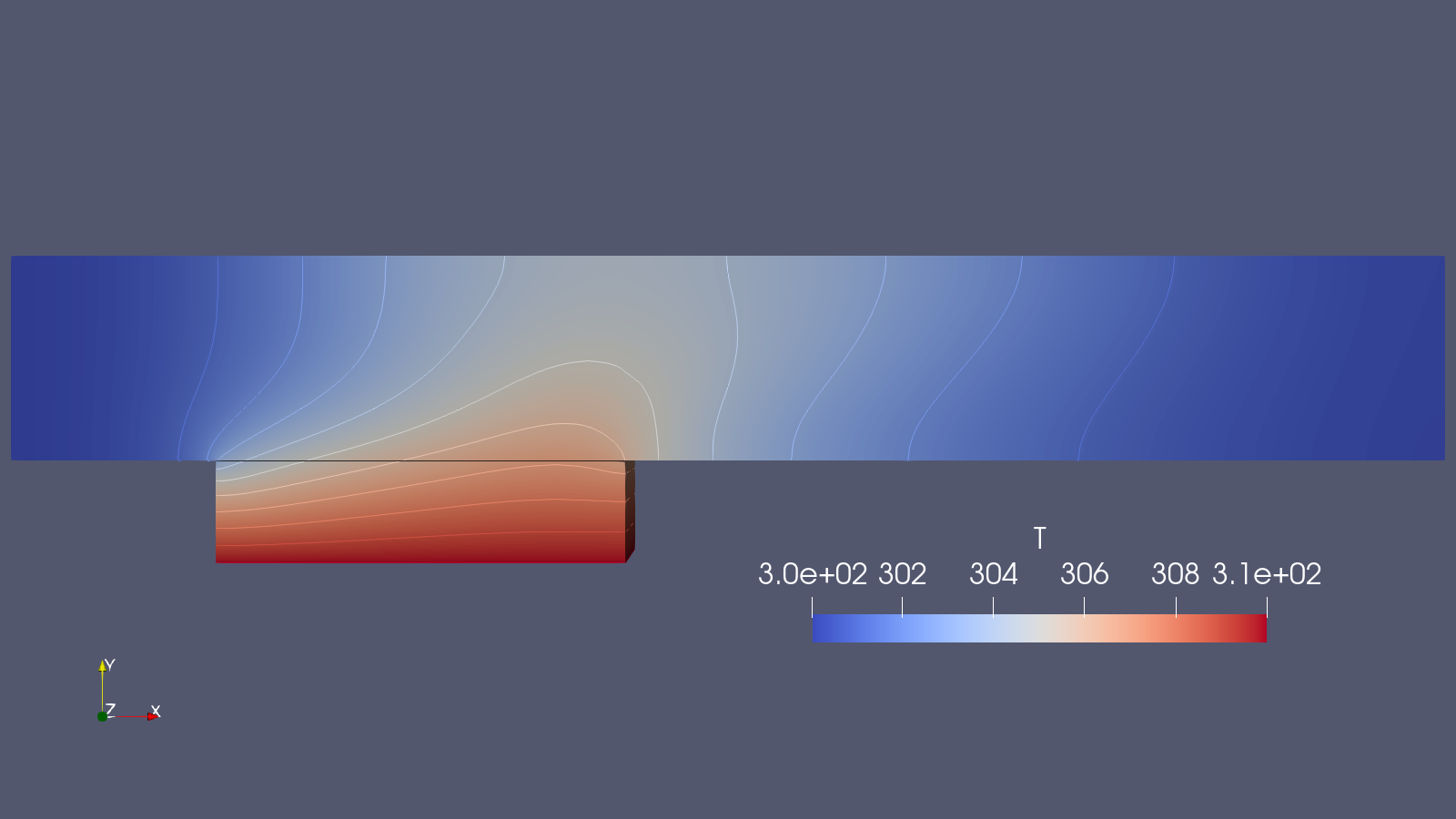
The result of the coupled solve after 10 seconds.
Find the completed input files below:
[Mesh]
    type = FoamMesh
    case = 'fluid-openfoam'  # the directory of the OpenFOAM case
    foam_patch = 'interface' # the name of the coupled boundary
[]

[FoamVariables]
    [fluid_wall_temp]
        type = FoamVariableField
        foam_variable<<<{"description": "OpenFOAM variable or functionObject to be shadowed"}>>> = 'T'
        initial_condition<<<{"description": "Specifies a constant initial condition for this variable"}>>> = 300
    []
[]

[FoamBCs]
    [solid_heat_flux]
        type = FoamDiffusionFluxBC<<<{"description": "A FoamBC that imposes a fixed gradient boundary condition on the OpenFOAM simulation"}>>>
        foam_variable<<<{"description": "Name of a Foam field. e.g. T (temperature) U (velocity)."}>>> = 'T'
        initial_condition<<<{"description": "Specifies a constant initial condition for this variable"}>>> = 0
    []
[]

[Problem]
    type = FoamProblem
[]

[Executioner]
    type = Transient
    start_time = 0
    end_time = 10
    dt = 0.025

    [TimeStepper]
        type = FoamTimeStepper
    []
[][Mesh]
[solid]
type = GeneratedMeshGenerator<<<{"description": "Create a line, square, or cube mesh with uniformly spaced or biased elements."}>>>
boundary_name_prefix<<<{"description": "If provided, prefix the built in boundary names with this string"}>>> = solid
dim<<<{"description": "The dimension of the mesh to be generated"}>>> = 3
nx<<<{"description": "Number of elements in the X direction"}>>> = 161
xmin<<<{"description": "Lower X Coordinate of the generated mesh"}>>> = 0
xmax<<<{"description": "Upper X Coordinate of the generated mesh"}>>> = 1
ny<<<{"description": "Number of elements in the Y direction"}>>> = 16
ymin<<<{"description": "Lower Y Coordinate of the generated mesh"}>>> = -0.25
ymax<<<{"description": "Upper Y Coordinate of the generated mesh"}>>> = 0
nz<<<{"description": "Number of elements in the Z direction"}>>> = 1
zmin<<<{"description": "Lower Z Coordinate of the generated mesh"}>>> = 0
zmax<<<{"description": "Upper Z Coordinate of the generated mesh"}>>> = 0.4
# Calculated here:
# https://openfoamwiki.net/index.php/Scripts/blockMesh_grading_calculation
# Based on a grading factor of 5 and 161 elements.
bias_x<<<{"description": "The amount by which to grow (or shrink) the cells in the x-direction."}>>> = 1.010109749
[]
[]
[Variables]
[temp]
family<<<{"description": "Specifies the family of FE shape functions to use for this variable"}>>> = LAGRANGE
order<<<{"description": "Specifies the order of the FE shape function to use for this variable (additional orders not listed are allowed)"}>>> = FIRST
initial_condition<<<{"description": "Specifies a constant initial condition for this variable"}>>> = 310
[]
[]
[Kernels]
[heat-conduction]
type = HeatConduction<<<{"description": "Diffusive heat conduction term $-\\nabla\\cdot(k\\nabla T)$ of the thermal energy conservation equation"}>>>
variable<<<{"description": "The name of the variable that this residual object operates on"}>>> = temp
[]
[heat-conduction-dt]
type = HeatConductionTimeDerivative<<<{"description": "Time derivative term $\\rho c_p \\frac{\\partial T}{\\partial t}$ of the thermal energy conservation equation."}>>>
variable<<<{"description": "The name of the variable that this residual object operates on"}>>> = temp
[]
[]
[BCs]
[fixed_temp]
type = DirichletBC<<<{"description": "Imposes the essential boundary condition $u=g$, where $g$ is a constant, controllable value."}>>>
variable<<<{"description": "The name of the variable that this residual object operates on"}>>> = temp
boundary<<<{"description": "The list of boundary IDs from the mesh where this object applies"}>>> = solid_bottom
value<<<{"description": "Value of the BC"}>>> = 310
[]
# Use the fluid wall temperature as a matched value boundary condition.
[fluid_interface]
type = MatchedValueBC<<<{"description": "Implements a NodalBC which equates two different Variables' values on a specified boundary."}>>>
variable<<<{"description": "The name of the variable that this residual object operates on"}>>> = temp
boundary<<<{"description": "The list of boundary IDs from the mesh where this object applies"}>>> = solid_top
v<<<{"description": "The variable whose value we are to match."}>>> = fluid_wall_temperature
[]
[]
[Materials]
# The example specifies that the thermal diffusivity of the solid should
# be α = 1 m2/s, and the thermal conductivity should be k = 100 W/(m.K).
#
# We know α = k/(ρ.Cp), where k is thermal conductivity, Cp is specific
# heat capacity, and ρ is density.
#
# Hence we require that ρ.Cp = k = 100.
[thermal-conduction]
type = HeatConductionMaterial<<<{"description": "General-purpose material model for heat conduction"}>>>
thermal_conductivity<<<{"description": "The thermal conductivity value"}>>> = 100.0 # W/(m.K)
specific_heat<<<{"description": "The specific heat value"}>>> = 0.5 # J/(kg.K)
[]
[thermal-density]
type = GenericConstantMaterial<<<{"description": "Declares material properties based on names and values prescribed by input parameters."}>>>
prop_names<<<{"description": "The names of the properties this material will have"}>>> = 'density'
prop_values<<<{"description": "The values associated with the named properties"}>>> = 200.0 # kg/m3
[]
[]
[AuxVariables]
[wall_heat_flux]
family<<<{"description": "Specifies the family of FE shape functions to use for this variable"}>>> = MONOMIAL
order<<<{"description": "Specifies the order of the FE shape function to use for this variable (additional orders not listed are allowed)"}>>> = CONSTANT
initial_condition<<<{"description": "Specifies a constant initial condition for this variable"}>>> = 0
[]
# Add an AuxVariable to store the wall temperature of the fluid domain.
[fluid_wall_temperature]
family<<<{"description": "Specifies the family of FE shape functions to use for this variable"}>>> = LAGRANGE
order<<<{"description": "Specifies the order of the FE shape function to use for this variable (additional orders not listed are allowed)"}>>> = FIRST
initial_condition<<<{"description": "Specifies a constant initial condition for this variable"}>>> = 0
[]
[]
[AuxKernels]
[heat_flux_aux]
type = DiffusionFluxAux<<<{"description": "Compute components of flux vector for diffusion problems $(\\vec{J} = -D \\nabla C)$."}>>>
variable<<<{"description": "The name of the variable that this object applies to"}>>> = wall_heat_flux
diffusion_variable<<<{"description": "The name of the variable"}>>> = temp
diffusivity<<<{"description": "The name of the diffusivity material property that will be used in the flux computation."}>>>=thermal_conductivity
component<<<{"description": "The desired component of flux."}>>>=normal
boundary<<<{"description": "The list of boundaries (ids or names) from the mesh where this object applies"}>>> = 'solid_top'
[]
[]
[MultiApps]
[hippo]
type = TransientMultiApp<<<{"description": "MultiApp for performing coupled simulations with the parent and sub-application both progressing in time."}>>>
app_type<<<{"description": "The type of application to build (applications not registered can be loaded with dynamic libraries. Parent application type will be used if not provided."}>>> = hippoApp
execute_on<<<{"description": "The list of flag(s) indicating when this object should be executed. For a description of each flag, see https://mooseframework.inl.gov/source/interfaces/SetupInterface.html."}>>> = timestep_begin
input_files<<<{"description": "The input file for each App. If this parameter only contains one input file it will be used for all of the Apps. When using 'positions_from_file' it is also admissable to provide one input_file per file."}>>> = 'fluid.i'
[]
[]
[Transfers]
# Copy the wall temperature from the fluid into an AuxVariable.
[wall_temperature_from_fluid]
type = MultiAppGeometricInterpolationTransfer<<<{"description": "Transfers the value to the target domain from a combination/interpolation of the values on the nearest nodes in the source domain, using coefficients based on the distance to each node."}>>>
source_variable<<<{"description": "The variable to transfer from."}>>> = fluid_wall_temp
from_multi_app<<<{"description": "The name of the MultiApp to receive data from"}>>> = hippo
variable<<<{"description": "The auxiliary variable to store the transferred values in."}>>> = fluid_wall_temperature
execute_on<<<{"description": "The list of flag(s) indicating when this object should be executed. For a description of each flag, see https://mooseframework.inl.gov/source/interfaces/SetupInterface.html."}>>> = same_as_multiapp
[]
# Copy the heat flux from the 'wall_heat_flux' aux variable into the
# multiapp.
# Remember we marked the 'solid_heat_flux' variable in 'fluid.i' to be
# used as a heat flux boundary condition on the OpenFOAM solve.
[heat_flux_to_fluid]
type = MultiAppGeometricInterpolationTransfer<<<{"description": "Transfers the value to the target domain from a combination/interpolation of the values on the nearest nodes in the source domain, using coefficients based on the distance to each node."}>>>
source_variable<<<{"description": "The variable to transfer from."}>>> = wall_heat_flux
to_multi_app<<<{"description": "The name of the MultiApp to transfer the data to"}>>> = hippo
variable<<<{"description": "The auxiliary variable to store the transferred values in."}>>> = solid_heat_flux
execute_on<<<{"description": "The list of flag(s) indicating when this object should be executed. For a description of each flag, see https://mooseframework.inl.gov/source/interfaces/SetupInterface.html."}>>> = same_as_multiapp
[]
[]
[Executioner]
type = Transient
start_time = 0
end_time = 10
dt = 0.025
fixed_point_abs_tol = 1e-7
fixed_point_rel_tol = 1e-8
solve_type = 'PJFNK'
petsc_options = '-snes_ksp_ew'
petsc_options_iname = '-pc_type -pc_hypre_type'
petsc_options_value = 'hypre boomeramg'
nl_abs_tol = 1e-7
nl_rel_tol = 1e-8
[]
[Outputs]
exodus<<<{"description": "Output the results using the default settings for Exodus output."}>>> = true
[]